How many times a week do you open a tab just to check on something? The forecast, to see if tonight's cold enough to freeze the tomatoes. The school website, in case there's a snow delay. Your inbox, digging for that one bill you swear is due sometime this week.
IFTTT.ai connects more than 1,000 apps and devices so one thing happening can set off another, and it now has two new AI features to help with all that checking. The first, AI Agent, keeps an eye on web pages for you, notices when a number on a page changes, and handles small jobs across your apps when you describe them in plain words. The second, AI Action assist, is a new switch in the Applet builder that has AI write your Applet's message each time it runs.

Read on to see how each one works, plus a bunch of Applets you can turn on today.
Meet AI Agent and AI Action assist
Every automation you build is called an Applet. AI Agent adds three new things your Applets can do, and AI Action assist adds one more.
New item on a page
New item on a page is an AI Agent trigger that watches a page for something new. Paste the link to a page that lists things, like adoptable pets or school announcements, and IFTTT.ai checks it for you. Anything already on the page when you start counts as old news, so your first alert is for something new.
For the best results, start with a public page that clearly lists updates or shows the number you want. Some stores and pages that load their content with JavaScript may not work yet, and we're expanding the kinds of pages AI Agent can watch.
Number on a page changes
Number on a page changes is an AI Agent trigger that watches one number on a page, like a price or a temperature. Tell it which number to read, in the page's own words ("tonight's low"), and the line you care about. The first check sets the starting point. After that, your Applet runs when the number crosses your line, or anytime it changes if you'd rather, and your alert can show the new number next to the old one.
Run actions across your services
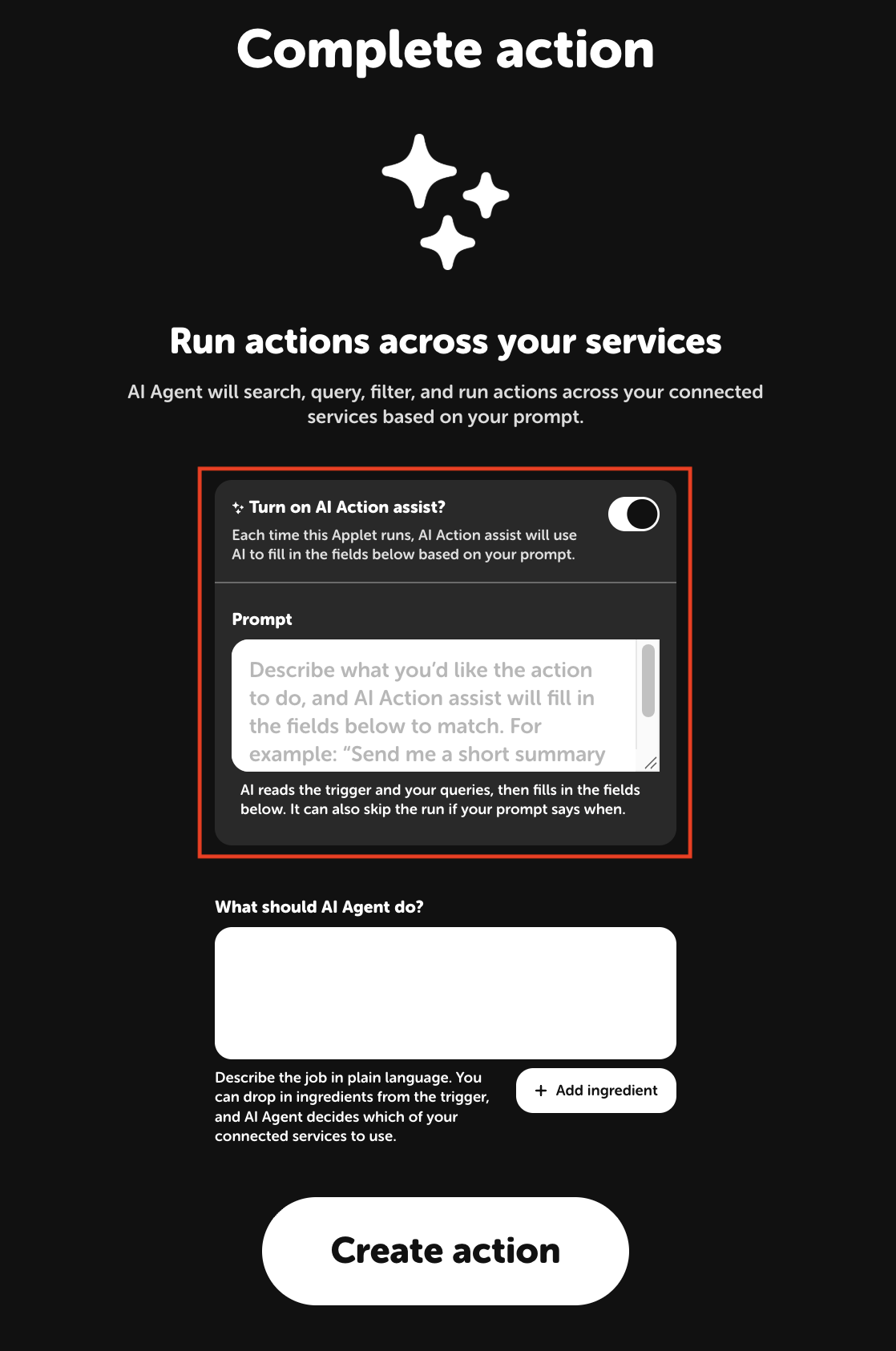
Run actions across your services is AI Agent's action, the step at the end of an Applet. Instead of picking one fixed step, like "add a calendar event," you write the job out in plain words, and AI Agent figures out which of your connected apps to use. Say your Applet runs whenever a bill lands in Gmail. You tell AI Agent: "If this email has a payment due date, check my Google Calendar for an event naming the company on that date. If one exists, skip it. Otherwise add an all-day event with the company and amount. If there's no due date, skip and say why." AI Agent reads the email, checks your Google Calendar, and adds the event. Any email it skips shows the reason in the Applet's activity.
AI Action assist
This one fills in your Applet's message for you. Every Applet ends with an action, like sending you an email or a notification, and that action has text to fill in: a subject line, a message, a body. Usually that text follows the same template every time. Turn on AI Action assist and add an instruction, and AI writes that text fresh on each run, based on whatever set the Applet off.
Say your Applet emails you every new story from a tech news site. Add the instruction "Write a two-line summary of this story. Only send it if it's about AI or machine learning. Otherwise skip and say why in one sentence." The AI stories show up in your inbox already summarized, and the rest get skipped, each with a one-line reason in the Applet's activity. To try it, open an Applet you've made on the web, click its action, and switch on AI Action assist. You can turn it on for one action per Applet.
Whatever AI Agent or AI Action assist does, the Applet's activity page tells you what got done, what got skipped, and why.
Everyday ways to use AI Agent
Here's what that looks like in real life, starting with the plants on your porch.
1. Around the house
It's the first cold night of fall, and you remember the basil on the porch at 11PM, already in your pajamas, holding your phone flashlight. A frost alert gets you out there before dinner instead. AI Agent reads tonight's low on your local forecast page and sends you a notification once it drops below a temperature you pick, like 33°F for basil or 28°F for hardier plants.
The pages you check out of habit work the same way. Point AI Agent at your city's public works page, and you'll hear about the holiday trash schedule before you're the only house on the block with bins at the curb. Point it at your local shelter's adoptable pets page, and the email about a new beagle mix shows up while you're still at your desk, not after someone else has filled out the application.
Then there's the library hold you placed three weeks ago and forgot about. When the "ready for pickup" email lands in Gmail, AI Agent adds a Todoist task with the book's title, due on the last day you can grab it.
-
Get a frost alert when tonight’s low drops below a specific temperature
-
-
Get a notification when your city’s public works page posts an update
 1
1
-
-
Get an email when your local shelter lists a new pet
-
-
Add a Todoist task when a library hold is ready for pickup
-




2. School, kids, and the family calendar
Somewhere in this week's school newsletter, between the bake sale recap and a plea about lost water bottles, is the date for picture day. You'll find it the morning of, when your kid comes downstairs in the hoodie with the ketchup stain.
AI Agent can read those emails before you do. When something arrives from the school, it pulls out each date and adds it to your Google Calendar, skipping anything already there or already past. The PTA update that takes four scrolls to get through gets a similar treatment: AI Agent sends you a three-bullet recap with the dates, what to bring or pay for, and anything that needs a reply.
Some news hits the district website before it ever reaches your inbox, like a two-hour delay posted at 5:45AM while you're packing lunches. Have AI Agent watch the district's news page, and the post shows up on your phone as a notification. If there's a baby at home, the Consumer Product Safety Commission's recalls page is worth watching too. Each new recall lands in your inbox with the product name and a link, so you can check it against the high chair in your kitchen.
-
Add dates from school emails to Google Calendar
-
-
Get a three-bullet summary of PTA emails
-
-
Get a notification when your school district posts news
1
-
-
Get an email when the CPSC posts a new recall
1
-
3. Bills, receipts, and the free trial you forgot about
The streaming service you signed up for to watch one show renewed last Tuesday. You still haven't watched anything else on it. Meanwhile, the electric bill was due Friday, which you found out on Saturday.
AI Agent reads those emails so the dates land somewhere you'll actually look. When a bill arrives, it checks your Google Calendar and adds an all-day "Pay [company]" event on the due date, with the amount if the email lists it. Bills that are already on your calendar get skipped. When a free trial is about to end or a subscription is about to renew, it puts a reminder on your calendar the day before, price included, so you get one night to decide if it's worth keeping.
Receipts go into a Google Sheets spreadsheet with the date, store, and total, which makes the end-of-month "wait, where did it all go?" conversation a lot shorter. Shipping updates and ads get skipped.
New subscriptions get their own sheet, with the price, billing cycle, and next billing date, so you can see the gym, the meal kit, and all three streaming services in one place.
-
Put bill due dates on Google Calendar
-
-
Get a reminder before a free trial ends or a subscription renews
1
-
-
Log email receipts to a spreadsheet
1
-
-
Log new subscriptions to a spreadsheet
1
-
4. The things you remember at 10PM
It's 10PM, you're brushing your teeth, and you suddenly remember the dentist called, the library books are due, and you still haven't called your mom about Thanksgiving. Open the Note widget and type it exactly how it comes out: "dentist tues 3pm, return library books, call mom about thanksgiving." AI Agent sorts it out, putting the dentist on your calendar and the rest on your Todoist list.
The emails you star to deal with later can turn into to-dos too. Star one in Gmail, and AI Agent adds a Todoist task with the sender's name, what they're asking for, and a due date if the email mentions one.
A few minutes before each meeting, a one-line notification tells you what it is, when it starts, and where to go: the address if there is one, or the video link if there isn't. So you can stop walking into a conference room for what turns out to be a Zoom call.
And when you finally book that trip, AI Agent reads the confirmation emails. Flights go on your calendar at departure time with the flight number and confirmation code right in the title, and hotel stays block out check-in to check-out. At the airport, the code is one tap away instead of buried under three days of email.
-
Turn a quick note into calendar events and to-dos
1
-
-
Turn starred emails into Todoist tasks
1
-
-
Get a one-line reminder before each meeting
1
-
-
Add flights and hotel stays from email to Google Calendar
-


5. Keeping your business on track
A regular mentions, while paying, that the shop across town just dropped their prices. You'd been meaning to check their website for a month. AI Agent can watch a competitor's pricing page for you and send a notification when the price changes, with the old number right next to the new one.
Then there's the inbox. A potential customer fills out your contact form on Friday night, and by Monday it's buried under 40 other emails. When an inquiry comes in, AI Agent adds a Todoist task to reply, due the next day, with the person's name, email, and what they're asking about. Spam gets skipped.
Payment confirmations get sorted too. Each one goes into a Google Sheets spreadsheet with the date, client, amount, and invoice number, so when a client asks whether their payment went through, you can check in ten seconds.
And when a client meeting lands on your calendar, AI Agent adds a prep task for the day before, so you're not skimming their last email in the parking lot. Internal meetings and personal events get skipped.
-
Get a notification when a competitor changes their price
-
-
Turn website inquiries into follow-up tasks
-
-
Log client payments to a spreadsheet
-
-
Add a prep task before every client meeting
-
Applets to try
Got a page or a job of your own in mind? These AI Agent Applets are ready to turn on. Add the page you want watched or the job you want done.
-
Get notified when AI Agent finds a new item on a page
1
-
-
Send Email when AI Agent finds a new item on a page
1
-
-
Append AI Agent page items to Google Sheets
-
-
Run AI Agent when Telegram message contains key phrase
-
-
Send Telegram message when AI Agent finds a new item on a page
1
-
-
Post to Slack when a new item appears on a page
-
-
Process new Google Drive files with AI Agent
-
-
Run AI Agent when a new Google Calendar event is added
-




Connect your tools
If your reminders and plans live in other apps, these make good homes for the alerts and to-dos your AI Applets send your way:
-
 Android SMS
-
 Google Tasks
-
 iOS Calendar
-
 Apple Reminders
-
 Microsoft Teams
-
 Microsoft To Do
-
 OneNote
-
 Trello
Bring your favorite AI into the mix
Already have a go-to AI? You can use it in your Applets too. Have ChatGPT, Claude, Perplexity, or Gemini draft a reply to the email you've been avoiding.
IFTTT also has its own lineup of AI tools that plug in the same way Summarizer boils long notes down to the key points, Translation Agent turns a message into another language, and AI Label Checker checks whether a photo carries a label saying it was made or edited with AI. There are also assistants for social posts, grammar checks, and more.
-

 Content Creator Agent
-
 Facebook Agent
-
 Grammar Agent
-
 AI Label Checker
-
 Prompt Agent
-
 Social Creator Agent
-
 Summarizer
-
 Translation Agent
-
 X (Twitter) Agent
-
 AI YouTube Agent
-
 ChatGPT
-
 Anthropic Claude
-
 Gemini
-
 Perplexity
Start with the tab you open the most
Think back on your week. Maybe you refreshed the shelter page on your lunch break, or checked the forecast twice before bed, or let a pile of school emails sit unread since Monday. Pick that one, turn on the Applet that matches it, and let the next alert come to you.