










Share new WordPress posts to Facebook Pages and X
Other popular Facebook Pages workflows and automations
-
 1.25k
-
-
Share new Blogger posts to your Facebook Page
1.99k
-
-
Share new RSS feed items to Facebook Pages
12.3k
-
-
Share new Blogger posts to your Facebook Page
5.99k
-
-
Automatically upload your Instagrams to a Facebook Page Album
39k
-
-
Share new Facebook link posts to your Facebook Page
903
-
-
Share new Tumblr posts on your Facebook Page
1.35k
-
-
Post a monthly message to your Facebook Page
6.2k
-
-
Share new YouTube videos to Facebook Page and X
10.4k
-








Automate Facebook Pages and SurveyMonkey from your AI assistant
Ask Copilot to create Facebook Pages applets for you, right from your AI assistant, with IFTTT MCP.
Set up IFTTT MCP


Create your own Facebook Pages and SurveyMonkey workflow
Create custom workflows effortlessly by selecting triggers, queries, and actions. With IFTTT, it's simple: “If this” trigger happens, “then that” action follows. Streamline tasks and save time with automated workflows that work for you.
16 triggers, queries, and actions
New contact added

Polling trigger
Polling Applets run after IFTTT reaches out to the trigger service and finds a new trigger event. These trigger checks occur every hour on Free, every 15 minutes on Starter, and every 5 minutes on Pro and Pro+.
This Trigger fires every time a new contact is added to the specified list.
New link post on page

Polling trigger
Polling Applets run after IFTTT reaches out to the trigger service and finds a new trigger event. These trigger checks occur every hour on Free, every 15 minutes on Starter, and every 5 minutes on Pro and Pro+.
This Trigger fires every time you create a new link post on your Facebook Page.
New link post with hashtag on page
Polling trigger
Polling Applets run after IFTTT reaches out to the trigger service and finds a new trigger event. These trigger checks occur every hour on Free, every 15 minutes on Starter, and every 5 minutes on Pro and Pro+.
This Trigger fires every time you create a new link post with a specific hashtag on your Facebook Page.
New photo upload on page
Polling trigger
Polling Applets run after IFTTT reaches out to the trigger service and finds a new trigger event. These trigger checks occur every hour on Free, every 15 minutes on Starter, and every 5 minutes on Pro and Pro+.
This Trigger fires every time you upload a new photo on your Facebook Page.
New photo upload with hashtag on page
Polling trigger
Polling Applets run after IFTTT reaches out to the trigger service and finds a new trigger event. These trigger checks occur every hour on Free, every 15 minutes on Starter, and every 5 minutes on Pro and Pro+.
This Trigger fires every time you upload a new photo with a specific hashtag on your Facebook Page.
New status message on page
Polling trigger
Polling Applets run after IFTTT reaches out to the trigger service and finds a new trigger event. These trigger checks occur every hour on Free, every 15 minutes on Starter, and every 5 minutes on Pro and Pro+.
This Trigger fires every time you create a new status message on your Facebook Page.
New status message with hashtag on page
Polling trigger
Polling Applets run after IFTTT reaches out to the trigger service and finds a new trigger event. These trigger checks occur every hour on Free, every 15 minutes on Starter, and every 5 minutes on Pro and Pro+.
This Trigger fires every time you create a new status message with a specific hashtag on your Facebook Page.
New survey created
Polling trigger
Polling Applets run after IFTTT reaches out to the trigger service and finds a new trigger event. These trigger checks occur every hour on Free, every 15 minutes on Starter, and every 5 minutes on Pro and Pro+.
This Trigger fires every time you create a new survey in SurveyMonkey.
New survey response
Polling trigger
Polling Applets run after IFTTT reaches out to the trigger service and finds a new trigger event. These trigger checks occur every hour on Free, every 15 minutes on Starter, and every 5 minutes on Pro and Pro+.
This Trigger fires every time there is a new survey response for the survey you specify.
History of contact added
Query
A query lets your Applet retrieve extra data that isn't included in the trigger, so that your automation can include more complete or useful information.
This query returns a list of when new contacts were added to the specified list.
History of survey responses
Query
A query lets your Applet retrieve extra data that isn't included in the trigger, so that your automation can include more complete or useful information.
This query returns a list of when there were new survey responses for the survey you specify.
History of surveys created
Query
A query lets your Applet retrieve extra data that isn't included in the trigger, so that your automation can include more complete or useful information.
This query returns a list of when you created new surveys in SurveyMonkey.
Add new contact to list
Action
An action is the task your Applet carries out after the trigger occurs. It defines what happens as the result of your automation and completes the workflow.
This Action will add a new contact to the specified list.
Create a link post
Action
An action is the task your Applet carries out after the trigger occurs. It defines what happens as the result of your automation and completes the workflow.
This Action will create a new link post on your Facebook Page wall.
Create a status message
Action
An action is the task your Applet carries out after the trigger occurs. It defines what happens as the result of your automation and completes the workflow.
This Action will create a new plain text status message on your Facebook Page.
Upload a photo from URL
Action
An action is the task your Applet carries out after the trigger occurs. It defines what happens as the result of your automation and completes the workflow.
This Action will upload a new photo, from the given URL, to a Facebook Page album you specify.
Add new contact to list
Action
An action is the task your Applet carries out after the trigger occurs. It defines what happens as the result of your automation and completes the workflow.
This Action will add a new contact to the specified list.
Create a link post
Action
An action is the task your Applet carries out after the trigger occurs. It defines what happens as the result of your automation and completes the workflow.
This Action will create a new link post on your Facebook Page wall.
Create a status message
Action
An action is the task your Applet carries out after the trigger occurs. It defines what happens as the result of your automation and completes the workflow.
This Action will create a new plain text status message on your Facebook Page.
History of contact added
Query
A query lets your Applet retrieve extra data that isn't included in the trigger, so that your automation can include more complete or useful information.
This query returns a list of when new contacts were added to the specified list.
History of survey responses
Query
A query lets your Applet retrieve extra data that isn't included in the trigger, so that your automation can include more complete or useful information.
This query returns a list of when there were new survey responses for the survey you specify.
History of surveys created
Query
A query lets your Applet retrieve extra data that isn't included in the trigger, so that your automation can include more complete or useful information.
This query returns a list of when you created new surveys in SurveyMonkey.
New contact added
Polling trigger
Polling Applets run after IFTTT reaches out to the trigger service and finds a new trigger event. These trigger checks occur every hour on Free, every 15 minutes on Starter, and every 5 minutes on Pro and Pro+.
This Trigger fires every time a new contact is added to the specified list.
New link post on page
Polling trigger
Polling Applets run after IFTTT reaches out to the trigger service and finds a new trigger event. These trigger checks occur every hour on Free, every 15 minutes on Starter, and every 5 minutes on Pro and Pro+.
This Trigger fires every time you create a new link post on your Facebook Page.
New link post with hashtag on page
Polling trigger
Polling Applets run after IFTTT reaches out to the trigger service and finds a new trigger event. These trigger checks occur every hour on Free, every 15 minutes on Starter, and every 5 minutes on Pro and Pro+.
This Trigger fires every time you create a new link post with a specific hashtag on your Facebook Page.
New photo upload on page
Polling trigger
Polling Applets run after IFTTT reaches out to the trigger service and finds a new trigger event. These trigger checks occur every hour on Free, every 15 minutes on Starter, and every 5 minutes on Pro and Pro+.
This Trigger fires every time you upload a new photo on your Facebook Page.
New photo upload with hashtag on page
Polling trigger
Polling Applets run after IFTTT reaches out to the trigger service and finds a new trigger event. These trigger checks occur every hour on Free, every 15 minutes on Starter, and every 5 minutes on Pro and Pro+.
This Trigger fires every time you upload a new photo with a specific hashtag on your Facebook Page.
New status message on page
Polling trigger
Polling Applets run after IFTTT reaches out to the trigger service and finds a new trigger event. These trigger checks occur every hour on Free, every 15 minutes on Starter, and every 5 minutes on Pro and Pro+.
This Trigger fires every time you create a new status message on your Facebook Page.
Build an automation in seconds!
If

Select a trigger the automation will use
New contact added
 New link post on page
New link post with hashtag on page
New photo upload on page
New photo upload with hashtag on page
New status message on page
New status message with hashtag on page
New survey created
New survey response
Then
Select an action the automation will perform
Add new contact to list
Create a link post
Create a status message
Upload a photo from URL
You can add delays, queries, and more actions in the chat.
GET STARTED
How to connect to a Facebook Pages automation
Find an Applet using Facebook Pages and SurveyMonkey
Find an automation to connect to, or create your own!Connect IFTTT to your accounts
Securely connect the Applet services to your respective accounts.Finalize and customize your Applet
Review trigger and action settings, and click connect. Simple as that!Upgrade your automations with
-

Connect to more Applets
Connect up to 20 automations with Pro, and unlimited automations with Pro+ -
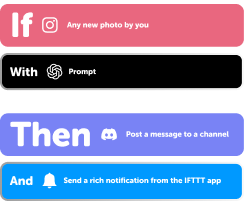
Add multiple actions with exclusive services
Add real-time data and multiple actions for smarter automations -

Get access to faster speeds
Get faster updates and more actions with higher rate limits and quicker checks
Facebook Pages and SurveyMonkey tips, tools, and resources
-
Popular
Welcome to IFTTT.ai: everything you need to get started
-
Popular
What your automations say about your aesthetic
-
Productivity
10 automation prompts you need to try

-
Popular
How to connect your first Applet
-
Popular
YouTube automation: The complete guide (2026)
-
Social media
How to post one piece of content to every platform, reformatted for each one
-
Productivity
Automations for students

-
Popular
Students get 90% off IFTTT

-
Business
The best social media management tools in 2026
More on Facebook Pages and SurveyMonkey
About Facebook Pages
Facebook Pages and IFTTT let you automatically cross-post your content and reshare activity from your page to other platforms.
About SurveyMonkey
SurveyMonkey and IFTTT let you automate survey workflows, from triggering actions when responses come in to adding contacts to your lists.